The Ultimate DDLC OC Template Guide: Design, Import, and Animate Custom Characters
The Ultimate DDLC OC Template Guide: Design, Import, and Animate Custom Characters
The *Doki Doki Literature Club!* (DDLC) fandom thrives on storytelling, world-building, and artistic expression. Among the most popular creative endeavors in the community is designing an Original Character (OC). Whether you want to add a fifth club member, craft a custom protagonist, or introduce a completely new storyline, having a structured DDLC OC template is essential for bringing your vision to life.
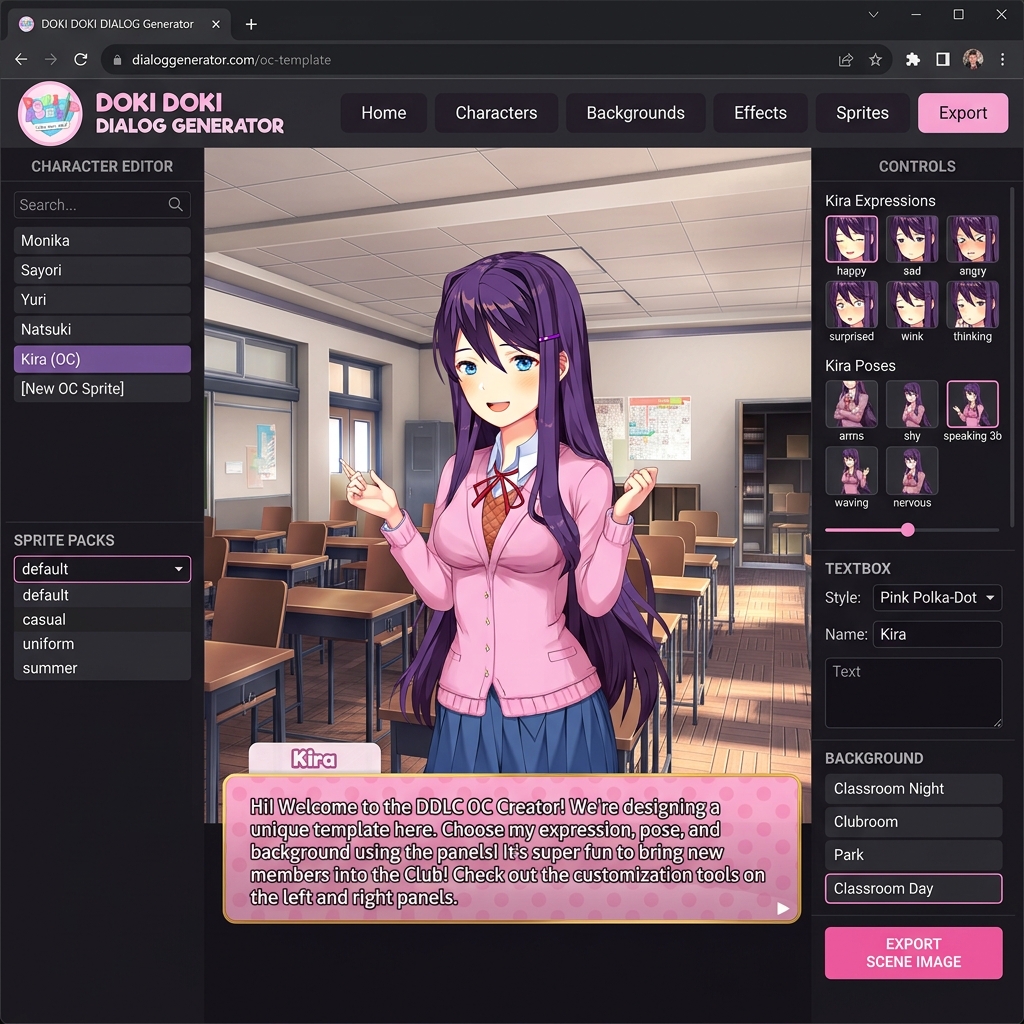
In this comprehensive guide, we will break down what a DDLC OC template is, how to prepare custom character sprites, and how you can bring your OC directly into high-quality visual novel dialogue panels using our online Doki Doki Dialog Generator.
---
1. What is a DDLC OC Template?
A DDLC OC template is a standardized visual and narrative framework designed to integrate custom fan characters into the aesthetic style of Team Salvato’s visual novel. Because *Doki Doki Literature Club!* has a distinct anime art style, uniform guidelines, and iconic dialogue interface, OC templates help creators maintain visual harmony with original characters like Monika, Sayori, Natsuki, and Yuri.
A complete DDLC OC template typically consists of four core elements:
1. Character Profile & Lore: Basic biographical details such as age, height, club role, poem style, and personality archetype (e.g., tsundere, kuudere, melancholic dreamer).
2. Layered Sprite Sheets: High-resolution PNG character artwork broken down into poses (arms, torso) and head facial features (eyes, eyebrows, mouth variations).
3. Outfit Assets: School uniform variants (blazer, sweater vest) and casual weekend attire.
4. Dialogue Panel Rendering: Presenting the character inside the signature DDLC pink polka-dot textbox or glitch environment.
---
2. Essential Components of a Quality DDLC OC Sprite Sheet
If you are drawing or commissioning a DDLC OC template, structuring your image files properly will save you countless hours during scene editing. Here are the key asset requirements to make your custom character compatible with visual novel tools:
Canvas Resolution and Perspective
- Dimensions: Standard DDLC character sprites are drawn on a transparent canvas (typically 960x960 pixels or higher HD resolution).
- Proportions: Match the game's line art style, soft shading technique, and eye highlight reflections so your OC looks natural standing beside Monika or Yuri.
- Camera Angles: Characters are traditionally drawn facing slightly forward with a 3/4 turn toward the center of the screen.
Layered Facial Features
Instead of drawing separate full-body images for every single emotion, modular OC templates use separate layers for maximum flexibility:
- Base Torso & Arms: Resting arms, pointing posture, crossed arms, or timid hand gestures.
- Eyebrows: Neutral, worried, furrowed in anger, or raised in surprise.
- Eyes: Open joyful eyes, wink, tearful glint, closed smiling eyes, or wide unblinking horror pupils.
- Mouth Shapes: Small smiles, open speaking mouths, pouting lips, gasping shocks, or wide laughs.
---
3. How to Render Scenes with Your DDLC OC Template
Traditionally, inserting a custom OC into a DDLC scene required downloading complex Python scripts, compiling Ren'Py engine code, or manually layering dozens of PNG graphics inside image editing software like Photoshop or GIMP.
With our browser-based Doki Doki Dialog Generator, you no longer need programming skills or tedious photo editing!
Step-by-Step Workflow in Doki Doki Dialog Generator
1. Access the Web Tool: Launch our free Doki Doki Dialog Generator directly in your desktop or mobile browser without installing anything.
2. Select Character & OC Pack: Choose from default club members or load your custom OC sprite assets into the editor panel.
3. Customize Poses and Expressions: Use the intuitive side controls to mix and match eye shapes, mouth styles, and arm postures in real time.
4. Pick Background & Textbox Theme: Place your OC in the Literature Clubroom, hallway, sunset classroom, or space void. Choose between Classic Pink Polka-Dot, Night Mode, or Glitched corruption textboxes.
5. Export Full HD Image: Click "Export Scene Image" to download a crisp 1280x720 PNG panel ready to share on Reddit, Discord, or fan fiction forums!
---
4. Tips for Writing Authentic DDLC OC Dialogue
Creating a visually striking DDLC OC template is only half the battle—giving your character a memorable voice is what truly makes fan comics resonate with readers.
Match the Pacing of Psychological Storytelling
- Start Grounded: Introduce your OC through lighthearted, everyday club interactions before diving into heavier emotional turns.
- Utilize Dynamic Poses: Change expression layers on individual lines of text. A subtle shift in eyebrows mid-sentence makes character interactions feel alive.
- Incorporate Poem Writing Styles: Give your OC a signature vocabulary list for poem mini-games (e.g., romantic, existential, abstract, or playful words).
---
5. Start Creating Your DDLC OC Scenes Today!
Building an original character is one of the most fulfilling ways to participate in the DDLC community. Whether you are creating a simple one-panel meme or an epic multi-chapter fan comic, our web tools give you the freedom to bring your character to life in seconds.
Ready to test your DDLC OC template in action? Launch the Doki Doki Dialog Generator right now and start generating your custom visual novel scenes!